Validation - RequiredFieldValidator
The RequiredFieldValidator is actually very simple, and yet very useful. You can use it to make sure that the user has entered something in a TextBox control. Let's give it a try, and add a RequiredFieldValidator to our page. We will also add a TextBox to validate, as well as a button to submit the form with.
<form id="form1" runat="server">
    Your name:<br />
    <asp:TextBox runat="server" id="txtName" />
    <asp:RequiredFieldValidator runat="server" id="reqName" controltovalidate="txtName" errormessage="Please enter your name!" />
    <br /><br />
    <asp:Button runat="server" id="btnSubmitForm" text="Ok" />
</form>
Actually, that's all we need to test the most basic part of the RequiredFieldValidator. I'm sure that all the attributes of the controls makes sense by now, so I won't go into details about them. Try running the website and click the button. You should see something like this:
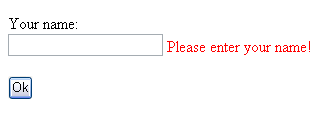
If your browser supports JavaScript, which most modern browers do, then you will notice that the page is not being posted back to the server - the validation is performed clientside! This is one of the really cool things about ASP.NET validators. Validation is only performed serverside if necessary! To see how it feels, you can add enableclientscript="false" to the RequiredFieldValidator and try again. Now you will see the browser posting back to the server, but the result will be the same - the validator still works!
Right now, the button does nothing, besides posting back if the page is valid. We will change this by adding an onclick event to it:
<asp:Button runat="server" id="btnSubmitForm" text="Ok" onclick="btnSubmitForm_Click" />In the CodeBehind file, we add the following event handler:
protected void btnSubmitForm_Click(object sender, EventArgs e)
{
    if(Page.IsValid)
    {
        btnSubmitForm.Text = "My form is valid!";
    }
}
As you will notice, we check whether or not the page is valid, before we do anything. This is very important, since this code WILL be reached if the clientside validation is not used, for some reason. Once it comes to serverside validation, it's your job to make sure that no sensitive code is executed unless you want it to. As you see, it's very simple - just check the Page.IsValid parameter, and you're good to go. Try to run the website again, and notice how the text of the button is changed if you submit a valid form.